[LINK UP AND RRRUSH!]
Connect Your Game Account to WEMIX PLAY
Ready to bring your squad to WEMIX PLAY?
Link your STONE RRRUSH! game account to access Web3 services.
One thing before you Rrrush: LINKING STARTS IN THE GAME!
-----------------------------------
[THE QUICK GUIDE]
Install & Launch the Game
▼
Clear Chapter 10
▼
Unlock Hellshard Item Exchange
▼
Tap a Service
▼
Redirect to WEMIX PLAY & Log In
▼
Agree to Personal Data Processing
▼
LINKED & READY TO RRRUSH!
-----------------------------------
[READY, SET, LINK!]
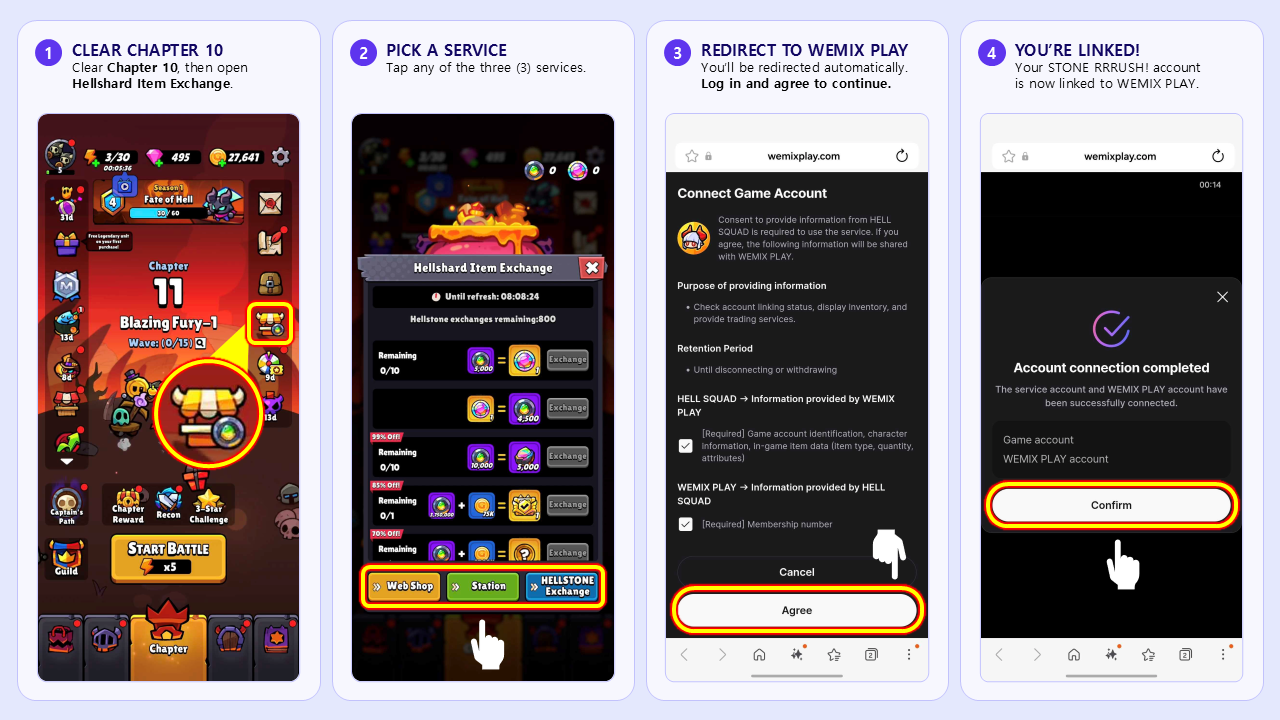
1. Clear Chapter 10
Jump into STONE RRRUSH! and clear Chapter 10.
Once cleared, Hellshard Item Exchange will unlock on the right side of the game screen.
No separate game sign-up is needed!
Your game account is automatically created based on your Google Play account.
2. Open Hellshard Item Exchange
Open Hellshard Item Exchange and tap any of the 3 services.
[ ⨠ Web Shop ] [ ⨠ Station ] [ ⨠ HELLSTONE Exchange ]
You’ll be redirected to WEMIX PLAY to continue.
3. Log In & Link Up
Log in to the WEMIX PLAY account you want to link, then agree to the Personal Data Processing Agreement to complete the link.
Pre-registered? Use the same WEMIX PLAY account you used for pre-registration.
LINKED & READY TO RRRUSH!
You can now access STONE RRRUSH! Web3 services on WEMIX PLAY.
-----------------------------------
!!QUICK FAQ!!
Q1. Can I link my account from WEMIX PLAY?
No. Account linking must start in STONE RRRUSH!
Clear Chapter 10, open Hellshard Item Exchange, and select a service. You’ll then be redirected to WEMIX PLAY to complete the link.
Q2. Why can’t I access the Webshop, Item Market, or Station?
Your game account needs to be linked first.
If you access the Item Market or Station before linking, you’ll be redirected to the WEMIX PLAY main page. You can browse the Webshop, but purchases won’t be available yet.
Head back to STONE RRRUSH! and complete the account linking process first.
Q3. Why can’t I find Hellshard Item Exchange?
Hellshard Item Exchange unlocks after you clear Chapter 10.
Once unlocked, you’ll find it on the right side of the game screen. It will show below the Inventory.
Connect Your Game Account to WEMIX PLAY
Ready to bring your squad to WEMIX PLAY?
Link your STONE RRRUSH! game account to access Web3 services.
One thing before you Rrrush: LINKING STARTS IN THE GAME!
-----------------------------------
[THE QUICK GUIDE]
Install & Launch the Game
▼
Clear Chapter 10
▼
Unlock Hellshard Item Exchange
▼
Tap a Service
▼
Redirect to WEMIX PLAY & Log In
▼
Agree to Personal Data Processing
▼
LINKED & READY TO RRRUSH!
-----------------------------------
[READY, SET, LINK!]
1. Clear Chapter 10
Jump into STONE RRRUSH! and clear Chapter 10.
Once cleared, Hellshard Item Exchange will unlock on the right side of the game screen.
No separate game sign-up is needed!
Your game account is automatically created based on your Google Play account.
2. Open Hellshard Item Exchange
Open Hellshard Item Exchange and tap any of the 3 services.
[ ⨠ Web Shop ] [ ⨠ Station ] [ ⨠ HELLSTONE Exchange ]
You’ll be redirected to WEMIX PLAY to continue.
3. Log In & Link Up
Log in to the WEMIX PLAY account you want to link, then agree to the Personal Data Processing Agreement to complete the link.
Pre-registered? Use the same WEMIX PLAY account you used for pre-registration.
LINKED & READY TO RRRUSH!
You can now access STONE RRRUSH! Web3 services on WEMIX PLAY.
-----------------------------------
!!QUICK FAQ!!
Q1. Can I link my account from WEMIX PLAY?
No. Account linking must start in STONE RRRUSH!
Clear Chapter 10, open Hellshard Item Exchange, and select a service. You’ll then be redirected to WEMIX PLAY to complete the link.
Q2. Why can’t I access the Webshop, Item Market, or Station?
Your game account needs to be linked first.
If you access the Item Market or Station before linking, you’ll be redirected to the WEMIX PLAY main page. You can browse the Webshop, but purchases won’t be available yet.
Head back to STONE RRRUSH! and complete the account linking process first.
Q3. Why can’t I find Hellshard Item Exchange?
Hellshard Item Exchange unlocks after you clear Chapter 10.
Once unlocked, you’ll find it on the right side of the game screen. It will show below the Inventory.
Comments 0